
Buying software often feels like a small decision: enter a card number, invite a few people, and start. The real costs come later, when the tool does not fit how you work, the price climbs at renewal, or you discover you cannot easily take your data with you.
A structured evaluation costs a few hours and can save months of frustration.
First, define what you need
Before you look at products, write the problem in one sentence and list requirements in two groups: must-haves that would make the tool useless if missing, and nice-to-haves. Ask the people who will use it daily. Then shortlist two or three options instead of testing ten.
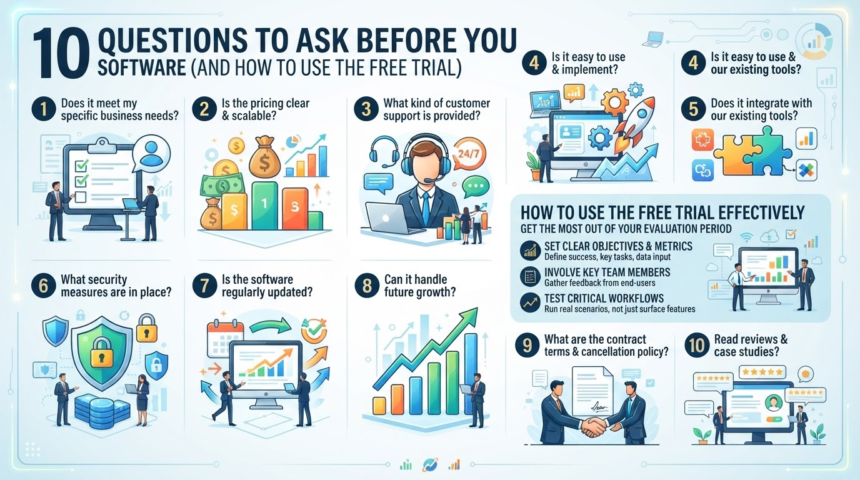
How to run a useful free trial
- Set a goal and a time limit. For example, ‘run one real project in seven days.’
- Use real work and realistic data. Demo data hides problems.
- Involve at least one everyday user. Their view differs from a manager’s.
- Test the unglamorous parts. Try importing, exporting, permissions, and support.
- Score as you go. Record what worked and what annoyed you.
- Calendar the end date. Cancel in time if it is not right, or check whether the plan renews automatically.
The ten questions
- Does it cover our must-haves without workarounds? If you need hacks on day one, expect pain later.
- What is the total cost? Include per-user fees, tiers, add-ons, setup, training, and what happens at renewal.
- What are the contract and cancellation terms? Look for auto-renewal, notice periods, and refunds.
- Can we get our data out? Confirm you can export in a usable format, and test it.
- How is data secured and handled? Ask about encryption, sign-in options such as two-step verification or single sign-on, where data is stored, and whether the vendor publishes security documentation.
- Does it work with our other tools? Check integrations you truly need.
- What does support look like? Test response time, hours, and documentation quality during the trial.
- How reliable is it? Look for a public status page and past outage history.
- How quickly will people adopt it? Consider training needs and time to first value.
- Is the vendor likely to be around? Check how long the company has operated, its update frequency, and its roadmap.
Build a scorecard
Give each criterion a weight based on your priorities, then score each tool from 1 to 5.
| Criterion | Weight | Tool A | Tool B |
|---|---|---|---|
| Must-have features | 5 | ||
| Total cost | 4 | ||
| Data export | 4 | ||
| Security | 4 | ||
| Ease of use | 3 | ||
| Support | 3 |
Multiply score by weight and add up. The numbers will not decide for you, but they will show where you are guessing.
Watch for red flags
- Pricing hidden until a sales call, with pressure to sign quickly
- Long contracts without a trial period
- No way to export data
- Vague answers on security
- Reviews that all sound alike
Negotiate and start well
Ask about annual versus monthly pricing, discounts for small teams or nonprofits, and whether prices are locked in for a period. Start with a small pilot group, document how you will use the tool, and review results after 90 days.
Secure it from day one
Use unique credentials and two-step sign-in, and limit admin access. Our guide to [[password-manager-and-passkeys-beginner-setup|password managers and passkeys]] covers the basics.
FAQ
Should I always choose the cheapest option?
No. A cheaper tool that fails your must-haves costs more in the end.
How long should a trial last?
Long enough to complete a real workflow, often a week or two.
What about accounting software?
The same questions apply. Pair them with a solid [[small-business-bookkeeping-monthly-routine|monthly bookkeeping routine]].
The takeaway
Define needs, test with real work, ask about cost, data, security, and support, and score the results. It is worth understanding how vendors earn their money too, so see [[how-companies-make-money-business-models-explained|how companies make money]] when you read the pricing page.